What an IFTA Fuel Receipt Must Show
IFTA only gives you credit for fuel tax you paid at the pump if you can prove the purchase. A receipt that is missing a detail, or that has been written over, can be refused in an audit, and the tax credit goes with it. Here is what the rules ask a fuel receipt to show.
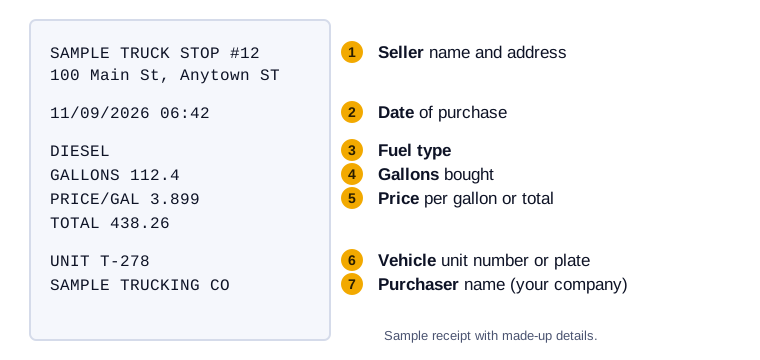
What a valid receipt shows
For tax-paid credit on a retail fuel purchase, the IFTA Procedures Manual lists these items:
- The date of the purchase.
- The seller's name and address. A properly identified vendor code can stand in for the full address.
- The number of gallons bought.
- The fuel type, such as diesel.
- The price, per gallon or in total.
- The vehicle that received the fuel, shown by unit number, plate or another identifier.
- The purchaser's name, meaning your company.
Receipts that have been altered or show erasures are not accepted for credit unless you can show they are genuine. IFTA also allows a credit card receipt, an automated invoice or a vendor transaction listing in place of a paper receipt, as long as it carries the same details.
The usual problems
- No unit number. The pump does not know which truck you were driving. Write the unit number on the receipt the same day.
- Faded thermal paper. A receipt that has gone blank in a hot cab proves nothing. Photograph it right away.
- Fuel for another vehicle on the same receipt, such as a pickup or a reefer unit, without a note of which gallons went where.
- Handwritten corrections. If a number is wrong, get a corrected receipt from the seller rather than changing it yourself.
How long to keep them
Keep fuel receipts and the records behind each return for at least seven years. Seven years is a safe margin, and storage is cheap. More on keeping records in the IFTA quarter-end checklist.
Make it a habit
Photograph each receipt before you leave the lot and enter the state, gallons and unit number while it is fresh. In Trip Sheet Central you can scan a receipt from your phone and attach it to the trip, so the paper can fade and the record stays.